Curious about virtual phone numbers, but don’t know where to start?
A virtual phone number is a telephone number that routes calls and texts over the internet. It uses Voice over Internet Protocol, or VoIP, technology to make this happen.
You can get a virtual phone number in three simple steps. You just need to choose a VoIP provider, create an account, and select your preferred local or toll-free number.
In this post, we’ll go over how virtual phone systems work, how to get a virtual phone number, and why your business may benefit from having one.
What is a virtual phone number?
A virtual phone number is a cloud-based business phone line. It works through your internet connection rather than traditional phone hardware.
You can make and receive business calls and texts on any device without giving out your personal number. Since it’s hosted virtually, you can use it from any location. They let you communicate more effectively with your customers compared to traditional mobile phones at a lower cost.

How to get a virtual phone number in 3 steps
You can get a virtual phone number for your business in just a few steps:
- Create a Quo account. Sign up and start your free seven-day trial.
- Pick your number. Select your city or area code in the US or Canada to get a local phone number. You can also choose a toll-free number.
- Start calling. After completing the rest of the sign-up process, you can start placing calls in your workspace.
Watch below to get a sneak peek of how to set up an account on Quo:

How to get a free virtual number
Want to try a virtual phone number but don’t want to pay for one? You can get free virtual numbers to make calls and send texts. Providers like Google Voice and TextNow offer free phone numbers for individual users. Here’s how to get a virtual number with them:
How to get a free virtual number with Google Voice
Google Voice gives you one free US number tied to your Google account. You’ll need a working phone that can receive texts, because Google sends a verification code to it.
- Download the Google Voice app from the App Store or Google Play or go to voice.google.com in a browser.
- Sign in with your Google account.
- Select your preferred virtual number, including the area code you’re looking for.
- Verify an existing phone number. Google texts you a code. Enter it to confirm your identity and finish setup.
Here are a few limitations of Google Voice you should know before you commit:
- No toll-free numbers
- The free version is available only in the US
- No dedicated customer support
- No business hours support
- You can’t share your phone number with your team
If those limitations are a dealbreaker for you, you should consider these Google Voice alternatives.
How to get a free virtual number with TextNow
TextNow gives you a free US or Canadian number for unlimited calling and texting over WiFi. It’s free because it’s supported by ads on their platform. Here’s how to get a number through TextNow:
- Download the TextNow app on iOS or Android, or open textnow.com in a browser.
- Create an account with an email address and password or sign in with Google or Apple. No ID verification required.
- Choose an area code. Allow location access to get a local area code automatically, or type in any US or Canadian area code you want.
- Start calling and texting. Stay on WiFi, and the service stays free. Cellular data costs extra.
TextNow might seem like a good option for your first virtual phone number. However, you should keep its limitations in mind if you consider getting a number from them:
- Ads show up between your calls and texts. They can distract you from your conversations.
- You could lose your number if you don’t use it enough. TextNow can reclaim a virtual number if you don’t regularly make calls and send texts with it.
- No shared numbers. You can’t share incoming calls and texts with a team.
- No third-party integrations. You can’t log your conversations in a CRM.
- No desktop and web apps. You can’t multitask and have conversations across multiple devices.
Free virtual phone providers are fine to get started. But if you want to scale your customer relationships using a virtual number, you should go with platforms designed for teams.
How much does a virtual number cost?
With many small businesses and startups embracing remote work, virtual phone numbers can help you save money while providing the business features you need.
The numbers don’t lie: smaller businesses can save thousands of dollars on business phone system costs by using virtual phone systems instead of traditional phone services. Virtual phone subscriptions typically cost $15–$50 per user per month, while on-premises PBX systems can cost up to $1,000 per user. Plus, you avoid hardware expenses like desk phones, which cost around $150 each.
You can use these savings to invest in more advanced features, like automated texting workflows, AI transcriptions, and analytics and reporting.
As a point of reference, Quo’s pricing starts at $15 per user per month. Here’s how it compares with free and paid virtual phone number options:
| Provider | Starting price | What you get | Available if you upgrade |
|---|---|---|---|
| Quo | $15 per user per month | Unlimited calls and texts, shared numbers, on-demand call recording, voicemail transcripts | Automatic call recording, AI call summaries and transcripts, IVR, CRM integrations |
| Dialpad | $15 per user per month | Unlimited calling in the US and Canada, SMS and MMS, AI call transcripts, multi-level auto attendant | CRM integrations, 24/7 live support, more ring groups, local numbers in 70+ countries |
| RingCentral | $20 per user per month | Unlimited calls, 25 texts per user per month, AI call summaries, shared numbers for calls only | Automatic call recording, CRM integrations, custom analytics, shared SMS inbox with a paid add-on |
| Google Voice | Free | One US number, calls and texts in the US, voicemail transcripts, spam filtering | Ring groups, multi-level auto attendant, number porting, AI call notes — from $10 per user per month |
| TextNow | Free | One US or Canadian number, unlimited calls and texts over WiFi, voicemail, caller ID | Ad-free app, locked-in number, call forwarding, cellular data — from $4.99 per month |
While virtual numbers offer more value for businesses compared to traditional PBX systems, not all virtual numbers are created equal. The price you see might catch your attention, but plan upgrades, hidden fees, and add-ons can paint a different picture. Here are a few examples:
- Available phone numbers. Quo assigns each user in a business account a dedicated phone number in its base plan. Providers like Dialpad only offer one phone number in their base plan. To get more numbers, you have to upgrade to its next tier.
- Texting limits. Quo offers unlimited domestic texting in each plan. RingCentral doesn’t offer unlimited texting in any plan. Once you exceed the limits in each plan, you’ll be charged for each message you send.
- Lack of shared numbers. Quo offers shared numbers in each plan. RingCentral only offers shared SMS texting when you purchase its Business SMS Booster add-on.
The bottom line: when you’re evaluating a virtual phone provider, keep an eye out for what they offer in each plan. The advertised price doesn’t always translate to your monthly bill.
Free vs paid virtual numbers: Which should you choose?
If you’re looking to reduce your phone bill, free virtual numbers may look like a great option. If you’re a solo business owner looking to get a second phone number, they’re a good way to get started. However, they don’t work well for teams. In some cases, they may require more work than you’d expect.
Here’s a quick comparison to show how each option stacks up:
| Feature | Paid virtual numbers | Free options |
|---|---|---|
| Shared phone numbers | ✅ | ❌ |
| Third-party integrations | ✅ | ❌ |
| AI features | ✅ | ❌ |
| Custom call routing | ✅ | ❌ |
| Advanced text messaging features | ✅ | ❌ |
| Desktop and mobile apps | ✅ | ❌ |
Free works until your business starts growing. Then three things break at the same time:
- You can’t share the number. Free apps are built for one person on one device. The moment you go on vacation or need coverage past 5 p.m., your team can’t take calls without you physically giving them the phone. Every call routes to one phone, and when that phone is busy, calls go to voicemail.
- Your texts stop going through. Carriers require businesses to register for A2P 10DLC compliance before sending texts to US numbers. Free apps don’t register you, so carriers filter your messages. You’ll send appointment reminders and quotes that don’t arrive, and you won’t know which ones.
- You can’t collaborate with your team. Beyond being unable to share calls, you lose team productivity and efficiency. You can’t tag your teammates in customer conversations, and you can’t track sales calls in your CRM. Plus, you can’t review calls quickly or analyze call and text trends.
Using a free provider to handle your business calls is like driving a car in first gear. It’s slow, and it hurts your business in the long term. Now that you know to choose a paid business phone provider, scroll down to learn about the essential features to look for.
7 Essential features you should get with a virtual phone number
Not all virtual phone providers are built the same. Some offer a basic second number and not much else. Others give you a full business communication system. Before you commit to a provider, make sure it includes these seven features.
1. Shared phone numbers and inboxes
Shared numbers let your team split responsibility for incoming calls and texts, which cuts down on missed calls and shortens response times. A shared team inbox puts every call, text, voicemail, and recording in one place, so you can see which teammate is talking to which customer.
This is the single biggest reason to get a virtual phone number rather than a second SIM card. It’s what lets a team move in sync instead of stepping on each other.
2. Customizable call flows
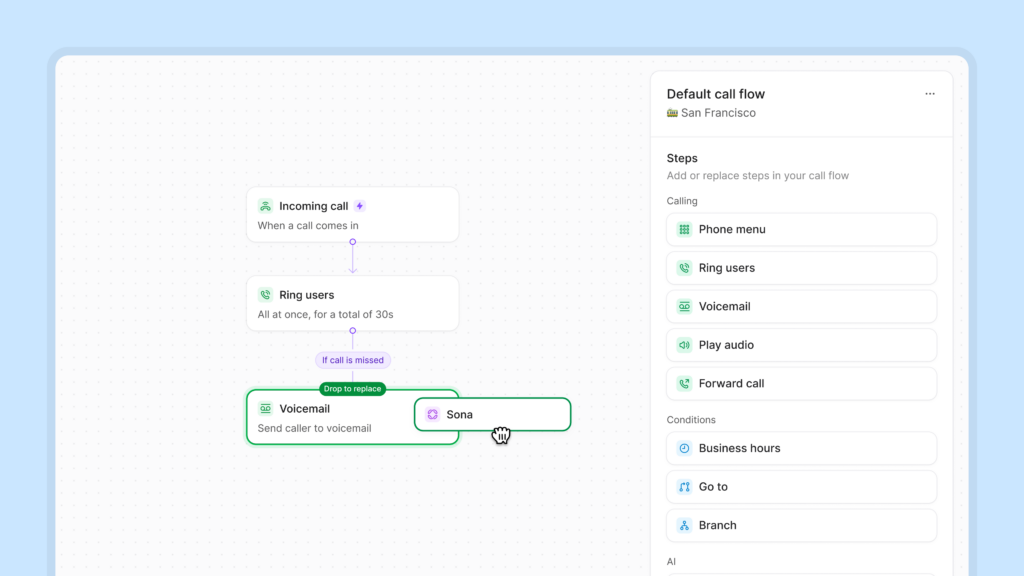
A call flow is a set of rules that decides what happens when a call reaches your number — who it rings first, what menu options callers hear, and where it goes if nobody picks up. Look for ring groups to control how calls reach your team, phone menus so callers can route themselves to the right department, and business hours so you can run different flows at different times of day.
The best providers bring all that together in a visual call flow builder. In Quo, you can drag and drop each step on a canvas, so you can see where a call will be routed before a customer dials.
3. Support for SMS and MMS
Many businesses use SMS as a customer communication channel. While it hasn’t replaced email and phone calls as the go-to support channel, SMS support has been increasing year over year.
Most traditional desk phones don’t support texting, making it harder to meet customers where they are. With a virtual SMS phone number, you can text customers and clients to support them however they need.
4. Call recording and transcriptions
Recording calls gives you a clear record of what customers shared with you during conversations. You can use call recordings to coach your team and to settle potential disputes. With a virtual phone number, you can record your calls and review them quickly with AI call summaries and transcriptions.
You can coach reps and keep track of what you committed to in every customer meeting. Listen back to discovery calls to hear what customers need in their own words. Look for automatic call recording so you don’t have to decide call by call.
Just make sure you record phone conversations with appropriate legal consent, since the rules vary by state.
5. Call forwarding during and after business hours
Managing customer expectations is simple with configurable call forwarding and voicemail settings. Let’s say you want to forward calls outside business hours to avoid missed calls. You can easily do this through your virtual number provider’s call flow settings. Enter your business hours, turn on call forwarding, and customize your call forwarding destination. You can route calls to your AI answering service, another phone number, or voicemail.
6. Third-party integrations
Integrations share your call and text data across your tech stack, so customer conversations show up where your team already works. Regular phones don’t integrate with anything, so conversations are siloed and your team loses context.
For fast-growing teams, the CRM is usually the source of truth. Logging calls by hand is admin work nobody does consistently. With HubSpot, Salesforce, and Jobber integrations, calls and texts log themselves. Virtual providers also connect to tools like Slack, Gong, and Zapier, with API access when you need something custom.
Newer on the list: AI tools. You can connect your virtual phone number to Claude and ChatGPT to analyze call and text data, pull conversation insights, and draft follow-ups.

7. Desktop, mobile, and web apps
Your virtual phone number should work wherever your team works — phones, computers, and tablets — with everything synced in real time so nobody is looking at stale information.
Pay attention to which apps a provider offers. Some have web and mobile apps, but no desktop app. Others offer desktop and mobile apps, but nothing in the browser. Check before you sign up, because it’s the kind of gap you only notice once your team is already using a platform.
Benefits of using virtual phone numbers
A basic virtual number gives you a second phone number. A great virtual phone system changes how your whole team communicates. Here are four things the right one does for your business:
- Never miss a customer call. Anyone with shared access to your business number can answer incoming calls and messages, so customers don’t fall through the cracks. With simultaneous ring, everyone gets notified at once, or you can set up a hunt group to control who rings first. When your team can’t pick up, a 24/7 AI answering service like Sona can capture leads, answer common questions, and take messages. Companies using Sona go from missing 70% of their calls to missing 10% or less.
- Collaborate better as a team. Everyone with shared access can see call history, voicemails, and text messages by contact, so anyone can pick up where a teammate left off. Internal threads let you tag a colleague next to a customer conversation without the customer seeing it. Tasks keep follow-ups from getting lost. You can also save what matters about each customer with custom properties and contact notes.
- Follow up with customers faster. Traditional phone providers offer bare-bones messaging. You can’t control when you message your customers, which can affect your speed to lead. Data from Drift shows the impact of speed to lead on conversion — even a five-minute delay can 10x your lead loss rate.
With Quo’s automated texting tools, you can send the right message at the right time to customers. Auto-replies answer missed calls instantly, scheduled messages go out at the right time, and snippets turn your most-asked questions into reusable text templates. Connect Zapier or Make and you can automate appointment reminders, review requests, and follow-ups across 9,000+ apps. - See how you’re doing in real time. A virtual phone number captures the data your business runs on — call and text volume, call duration, handle times, and unique conversations by day or week. You can spot your busiest times and staff the phones accordingly and pull audit logs when you need a record of who called when.

Disadvantages of virtual phone numbers you should know
At this point, you might be wondering: are virtual numbers too good to be true? While they come with perks, it’s important to take a balanced look before making a decision. Here are six drawbacks to keep in mind with virtual phone number providers:
- Hidden fees. Some providers may advertise low rates but include costs for features, toll-free minutes, or international calls. Similarly, you may have limits for text messaging or storage. Look for a provider that has a transparent pricing page.
- Difficulty registering. Registering a virtual phone number for SMS messaging can be complicated if the provider’s process isn’t user-friendly. With Quo, all you have to do is fill out our carrier registration form.
- Steep learning curve. A poorly designed interface can make it time-consuming to get your team up and running. It may even deter you from using features like call flows. Teams on Quo can get set up in minutes.
- Hard to scale. A provider with limited options may make it difficult to add more numbers or integrate advanced features. Rigid pricing plans could make scaling challenging and expensive. You can add users and change plans for more advanced features right in your Quo workspace.
- Requires high-bandwidth internet service. Since they run on VoIP technology, virtual numbers require internet access to work. If you’re in a remote location with low bandwidth or have a poor WiFi connection, you might be unable to make calls with your virtual number. Call quality depends on your internet connection. If you have a weak connection, try a wired internet connection or move closer to your router.
- No emergency calling. Since virtual numbers aren’t tied to a physical location, many providers don’t support emergency services like 911. If your business has a physical location that needs emergency calling, consider a backup landline number or a VoIP provider like Quo that offers E911 support.
Best virtual phone number apps compared
Not sure if Quo is right for you? Here’s how the top virtual phone number apps compare:
| Providers | Starting price, with annual billing | Best for | G2 rating |
|---|---|---|---|
| Quo | $15 per user per month | Shared numbers, inboxes, and 24/7 AI voice agent | 4.7 (~3,400 reviews) |
| RingCentral | $20 per user per month | Desk phone rentals | 4.2 (~1,470 reviews) |
| Google Voice | $10 per user per month | Google Workspace integrations | 4.1 (~160 reviews) |
| Dialpad | $15 per user per month | Call center teams | 4.4 (~4,200 reviews) |
| Nextiva | $15 per user per month | Social media and review management | 4.5 (~3,620 reviews) |
| Aircall | $30 per user per month, three-user minimum | Local numbers outside the US and Canada | 4.4 (~1,650 reviews) |
| Grasshopper | $14 per month | Multi-digit extensions | 3.9 (~160 reviews) |
| Phone.com | $15 per user per month | Dual eSIM functionality | 3.5 (~35 reviews) |
| Zoom Phone | $10.50 per user per month | Zoom Workplace integrations | 4.6 (~2,670 reviews) |
| GoTo Connect | Contact sales | Contact centers | 4.4 (~1,410 reviews) |
| Ooma Office | $19.95 per user per month | Legacy features like overhead paging and virtual fax | 4.5 (~130 reviews) |
🔍Want a full breakdown of these providers? Check out our guide to the best US virtual phone services.
How virtual phone numbers work
Virtual numbers transmit voice and text data over the internet. This method of transmission is called Voice over Internet Protocol, or VoIP. Once you dial the number you want to reach, your VoIP provider converts your voice into digital data and sends it to the call recipient instantly.
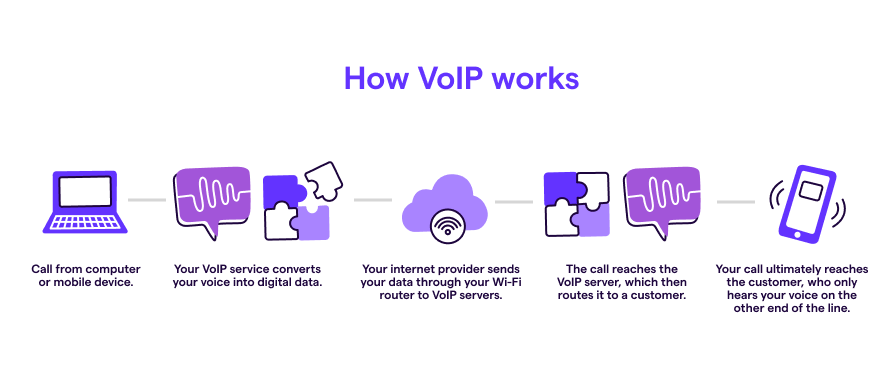
Virtual numbers operate differently compared to traditional landlines and cell phones. Traditional landlines use physical phone lines, known as Plain Old Telephone Service, or POTS, lines. These lines are directly connected to your home or office phone number. Since they rely on physical infrastructure, these lines are fixed. You can’t take your landline with you to make calls.
Cell phones convert voice signals into radio waves and transmit them through a network of cell towers. They’re a step up from traditional landlines, but they’re limited because each cell phone has its own SIM card and dedicated mobile number.
You don’t need to buy extra hardware or change your phone number to get a virtual phone number. Virtual phone providers operate cloud-based communications platforms. You just need to log into a provider’s platform to communicate with your customers at scale.
Since VoIP phones can make calls wherever you have an internet connection, you don’t have to pay for a separate mobile data plan.

Related: How to call without a SIM card
Types of virtual phone numbers
With a virtual phone system, you can get any kind of number you need. Here are the types of virtual numbers you can choose from:
- Local numbers. VoIP service providers offer thousands of local numbers in most area codes. Search for any city in the provider’s database to see which numbers are available. This can help you establish a local presence in the markets you serve. Most providers offer US and Canadian numbers in their databases. Some providers also offer local numbers outside the US and Canada.
- Toll-free numbers. Want a classic 800, 877, or 888 toll-free number to offer nationwide customer support? With virtual toll-free numbers, your North American callers can reach your business without paying long-distance fees.
- Vanity phone numbers. Vanity numbers like 1-800-FLOWERS are great if you want a number clients will remember. Get a custom vanity number that matches your brand.
All three types of numbers also offer international calling, so you can reach customers anywhere in the world.
Virtual vs traditional phone numbers
When you’re choosing a business phone system, you might be more familiar with traditional landlines. However, virtual phone numbers can offer your team key advantages over traditional phones. Here are the ones you should keep in mind:
- More cost-effective. Virtual numbers cost a fraction of traditional landlines. You don’t need expensive hardware to set them up. You can access a virtual number with your existing devices. Traditional numbers require custom equipment and constant maintenance, which can cost you thousands of dollars over time.
- Easy to set up and maintain. You can set up a virtual number in three simple steps. The best part is you can do it by yourself. Traditional numbers require a technician to install hardware in your office. Any time you run into a technical issue, you’ll have to bring them in to fix it.
- Built for scalability. Team members can use virtual numbers to take calls at home, in the office, or on the go. Traditional numbers are fixed at a single location, which limits where your team can take calls. You can add virtual numbers to multiple locations in minutes. With traditional numbers, you have to repeat the setup process. See how teams like Hannon De Palma use Quo to expand to new locations faster.
How to choose a virtual number provider
Plenty of virtual number providers are available. So how do you find the one best suited to your needs? Here’s a quick checklist:
- Features. Review your shortlist to see what each plan includes and which provider will make your team more productive. Do they offer value-added features like IVR menus and AI receptionists, or just basic calling and texting?
- Usability. Think about how many people will use the number. Not all providers let multiple teammates call and text from the same number, and that’s the feature teams miss most after they sign up.
- Plans and pricing. Analyze each provider against your team size and calculate the real cost, not just the listed one. Some providers limit the base plan to push you into upgrading, and add-ons like extra numbers and carrier registration are often priced separately.
- Reviews and ratings. See what a provider’s existing customers say about the platform. Visit G2, Capterra, and Trustpilot to collect real user reviews.
- Reliability and security. A public status page shows a provider is confident in its infrastructure. Check their uptime for the past three months to see whether the platform is stable. If there’s no status page, ask for a report.
- Free trial. For your top two or three options, sign up for the free trial and see how they work before committing. If a provider doesn’t offer one, that’s usually a sign they aren’t willing to let the platform speak for itself.
As you weigh your options, start with what you need your virtual number for:
- If you need a second number for personal use, for online shopping, or for sharing with businesses, a free app like Google Voice or TextNow is enough.
- If you need a number to communicate with customers and collaborate with your team, choose a business phone provider. That’s the moment shared numbers, call routing, and carrier registration stop being nice-to-haves.

If you want a business phone system with an easy-to-use interface and powerful call management features, consider Quo. Shared numbers reduce missed calls and texts. AI call summaries and transcripts keep your team on top of customer context. And Sona answers calls 24/7, even when your team can’t. More than 90,000 businesses use Quo, and we’re rated #1 on G2 for customer satisfaction.
Don’t just take our word for it:
“Quo not only has reliable coverage, a simple and intuitive app, and [a] super easy number porting process, it also has, hands-down, the friendliest customer service I have ever experienced from a web-based service provider.”
— Desirée Alarie, Realtor, Powell Property Group
Want to see it for yourself? Start a seven-day free trial of Quo.
FAQs
Services like Google Voice offer virtual personal phone numbers for free. Here’s how you can get one:
1. Sign in. Go to voice.google.com and sign in with your Google account.
2. Select numbers. Select available phone numbers by area code. Google also suggests a local phone number for you based on your location.
3. Verify existing number. You have to link an existing phone number to your Voice account for identity verification. Share your phone number, receive a verification code, and enter the code to continue.
4. Finish setup. That’s it. Click Finish to start using your free Voice number.
Google Voice’s free version has several limitations to keep in mind. These include no customer support, no toll-free numbers, no availability in Canada, and no ability to set business hours. Google Voice is meant more for personal use.
Fortunately, Google Voice alternatives offer the features your business needs.
While there aren’t many free virtual number apps available, you may still be interested in trying them out. Here are a few limitations you should keep in mind:
1. Security issues: Free virtual numbers are often recycled across different platforms. They are often flagged as spam, so your customers may not receive your calls and messages.
2. Limited features: Free virtual phone numbers offer calling and texting, nothing more. You can’t share numbers, schedule messages, sync data to your CRM, or manage your business communications efficiently. If you want to access those features, you’ll have to pay for a cloud-based VoIP provider.
3. Poor call quality: Free phone providers can’t guarantee call performance and reliability. Expect dropped calls, call jitter, and more issues when you talk with customers.
Most virtual phone number providers let you port your existing number to their platform. Some providers charge a porting fee to transfer your number. You can move any existing US, Canadian, or North American toll-free phone number to Quo for free.
Please fill out a short porting form in your Quo account with your previous carrier information and complete carrier registration. The process takes anywhere between two and four weeks and depends on how fast we hear back from your current phone service provider. Unfortunately, these timelines are out of our control and can’t be sped up.
Depending on your service provider, you can use online phone numbers with various devices like smartphones, tablets, laptops, and desktop computers. Just keep in mind that you’ll need a solid internet connection.
With any virtual phone provider, you need an existing number to verify your identity. Providers do this to prevent scammers from signing up for unlimited virtual phone numbers.
After you’ve signed up with a provider like Quo, you can add additional virtual numbers to your account without owning a phone. You can use your computer to make calls, send texts, and communicate with customers.
If you want to use a virtual phone number to text US numbers, you must comply with A2P 10DLC requirements. A2P 10DLC refers to Application-to-Person messaging; major telecom carriers pushed for these guidelines. It helps improve your text message deliverability rates and eliminates the risk of carriers filtering your outbound messages on their network.
A2P 10DLC compliance requires a multi-step application process that you can complete in your Quo dashboard. The average approval time is five to seven days, but some applications can take up to two weeks.
In addition to A2P 10DLC, the FCC requires that businesses adhere to the Telephone Consumer Protection Act, or TCPA. TCPA compliance requires businesses to collect opt-in consent for any customer communications. You should also honor opt-outs responsibly.
Yes, virtual phone numbers are legal. However, you have to follow a few legal requirements to use them.
The FCC requires businesses to follow the Telephone Consumer Protection Act, or TCPA. TCPA compliance requires businesses to collect opt-in consent for any customer communications. You’re also required to honor opt-outs.
You must also comply with A2P 10DLC requirements. A2P 10DLC refers to Application-to-Person messaging; major telecom carriers pushed for these guidelines. It helps improve your text message deliverability rates.
A2P 10DLC compliance requires a multi-step application process you can complete in your Quo dashboard. The average approval time is five to seven days, but some applications can take up to two weeks.
Plenty of services offer US virtual telephone numbers that you can get online. You can get local phone numbers for any city and state in the US on top of your existing personal number and a virtual business address. You can use your virtual phone line via a mobile app on your cell phone or computer; Quo is available on both. Then you can use your internet connection for calls and text messages.
Just keep in mind that some providers will only work in the US and Canada. Additionally, due to the larger cell phone companies seeking to reduce the spam their customers receive, you’ll need to complete US carrier registration if you wish to text customers from most virtual phone services.
Virtual numbers have some security concerns, such as potential vulnerabilities to hacking, spoofing, and phishing attacks. It’s important to use a reputable provider with encryption and security measures.
For example, Quo encrypts your data using the industry-standard AES-256 encryption algorithm. We are SOC 2 compliant, which means we take every precaution to prevent cyberattacks.
Virtual numbers appear just like any other number on caller ID. With providers like Quo, you can add your business name to your outbound caller ID. That way, your customers can see your business name in their caller ID menu when you call them. Keep in mind your caller ID name should match your business registration name.
You can get a toll-free number through a provider like Quo by selecting a new number during the sign-up process or adding it to your existing account. This allows your customers to call or text from anywhere without incurring long-distance charges.
The best virtual number provider depends on your specific needs. Businesses that require advanced features like AI call routing and CRM integrations may prefer platforms like Quo. Solopreneurs who just need a second number might find Google Voice or TextNow sufficient.
Yes! On most providers, you just need to enable international calling and text messaging. Then add credits so you can call and text non-US and Canadian numbers.
Quo users can send outbound SMS and MMS messages and make calls to any international landline or mobile number — VoIP or not. Similar to local phone calls, international calls go from a virtual number to a local phone over the internet. You can find international calling and testing rates on our rates page.
Regulations for international SMS vary by region, but you should always get opt-in consent before sending any marketing texts, identify yourself with your business name, and allow easy opt-outs.
Absolutely! With Quo, each user on your account comes with one phone number. You can add more for just $5 a month each. For example, you could have a main company number, a dedicated sales number, and a support number, all from one account. Then track call history and specific metrics for each call.
Virtual phone numbers aren’t accepted everywhere. Some platforms, in particular banks and secure services, may reject virtual numbers for SMS verification or two-factor authentication.
No, you can’t use a virtual number for WhatsApp Business. You can only use a mobile or landline number that you own. According to WhatsApp official support: Unsupported phone numbers can’t be registered on WhatsApp and include:
• VoIP
• Toll-free numbers
• Paid premium numbers
• Universal access numbers (UAN)
• Personal numbers
If someone wants to use your virtual number to find out your personal information, virtual numbers make that difficult. Virtual numbers aren’t tied to physical SIM cards or cellular networks, so they’re harder to trace than landline numbers.
Responsible virtual phone number providers invest in data security and encryption so that third parties can’t monitor your call and text activity. For example, at Quo, we ensure your conversations stay private by encrypting all your data in transit. Whether you’re texting a customer or storing contact details, your information is protected with the same encryption standards used by financial institutions.
VoIP providers still have access to your virtual phone activity to maintain regulatory and legal compliance. Under the Communications Assistance for Law Enforcement Act, or CALEA, telecom carriers and phone providers are required to comply with legal requests for access to communications logs. If a law enforcement agency has a subpoena to access virtual conversation activity, phone providers must give them the information.
We have a Fair Use Policy at Quo to ensure our users stay protected. We don’t allow certain types of content or messaging on our platform, and we remove users who violate our Terms of Service.
With a paid provider, the number is yours for as long as your account is active, and you can take it with you. FCC number portability rules require carriers to let you move your number to another provider, so switching doesn’t mean giving up the number your customers know.
On Quo, you can port a number out the same way you ported it in.
If you cancel without porting, the number doesn’t stay reserved. Providers typically hold it briefly, then release it back into circulation where it can be assigned to someone else. So if you’re leaving a provider but want to keep your number, start the port before you cancel.
Free apps operate differently. If you don’t use them within a certain period, the app reclaims it and assigns it to another user. You also can’t port them out to a different provider. You never fully own a free number, no matter how long you’ve had it.