Tired of getting client calls during dinner — or worse, in the middle of the night?
When you’re running a business, the last thing you want is to use your personal number for your company. It’s like posting your private phone number on social media. It’s not exactly a recipe for privacy or peace of mind.
But carrying two phones isn’t practical either, especially if you’re constantly on the move. The solution? A second phone number app that keeps your business and personal life separate. But how do you choose the right second phone number app?
The best second phone number app depends on whether the number is for you or for a business:
- For teams, a business phone app like Quo gives you a shared number, call recording, and CRM integrations from $15 per user per month.
- For solopreneurs, Google Voice is free to get started. However, you may quickly outgrow it and need a business phone app.
- For personal use, Burner and Hushed offer temporary private numbers. They offer different paid plans, and you can get multiple phone numbers at a time.
Free apps like TextNow are another option. However, you can’t share free second phone numbers with your team. They also don’t offer business-friendly features like CRM integrations and AI transcriptions. And if you don’t use your number enough, the app can reclaim it and assign it to another user.
We tested several top alternative phone number providers and narrowed it down to 12 options. We also looked at hundreds of reviews from real users, pricing, reliability, and the features that matter for day-to-day business use. Here are the best second phone number apps to consider.
What to look for in a second phone number app

With so many second phone number apps available, which ones should you consider? Here’s a quick guide to choosing a second phone number app.
- Personal vs business use. Some second number apps are designed for solo use, while others are meant for teams. If you just need a second number while traveling or shopping and want to protect your privacy, a personal second phone number app does the job. But when it comes to features like shared numbers, call recording, and CRM phone integrations, opt for business phone number apps.
- Call quality and texting features. Look for clear, stable call audio and texting tools that support SMS, MMS, and quick replies. If either is unreliable, the app won’t hold up day to day.
- Provides more value as you grow. Choose a second phone number app that scales with your business and keeps improving its features. As you add more team members, features like shared numbers help your staff handle calls and texts together instead of relying on a single person. And with collaborative features like internal threads and tasks, you can assign follow-up action items to your colleagues.
- Highly rated and reviewed. Read through what existing customers have to say about apps on your shortlist. Keep an eye out for app usability, reliability, and fast customer support.
- Number ownership and portability. The FCC’s porting rules require providers to allow you to port your number to another provider. However, some providers may not allow porting for prepaid numbers or restrict the number of ports you can do each month or year. A good provider will list their number porting policies upfront, including any fees.
- Pricing transparency. Look for second number apps with clear pricing plans that break down what’s included in each tier. Keep an eye out for limitations on calling minutes, texts, and users allowed on each plan. Understand how each provider makes money too. Free apps are usually supported by ads, so your data is valuable to them. Paid apps charge a subscription, so they’re motivated to keep building new features for you.
The 12 best apps for a second phone number
Now that you know what to look for in a second phone number app, here’s our list of best ones. To make this list, we compared each second phone number app’s real-world performance, user sentiment, and feature set. Here are the criteria we considered to rank the best second phone number apps:
- Ease of use. Simple setup and intuitive interface across desktop and mobile. We also considered how ad-heavy free apps impact navigation, responsiveness, and overall workflow.
- Available features. Essentials like call forwarding, texting automations, voicemail, and spam filters. For business users, we also looked into integrations, shared numbers, and collaboration features.
- Pricing compared to value. We compared monthly plans, pay-as-you-go options, and added fees to understand the actual cost. Apps that offered clear pricing and strong value for what you get received a ranking boost.
- Reliability. Consistent performance based on user feedback.
- Fit for personal vs business needs. Whether the app supports solo use, teams, or both.
- Customer support. How well the provider supports customers when issues come up.
- User reviews. Real experiences from people using these apps daily. We looked at ratings across G2, TrustPpilot, Reddit, and major app stores.
The best apps for a second phone number: Comparison table
Here’s a quick snapshot of how each of the best second phone number apps compares.
| Providers | Starting price | Best for | Key features |
|---|---|---|---|
| Quo, formerly OpenPhone | $15 | Growing businesses | Unlimited calling and texting, shared phone numbers, internal collaboration features, call recording and transcripts, voicemail recording and transcripts, IVR, texting automations, and +9,000 integrations |
| Google Voice | $0 per month for individual use, $17 per user per month for teams | Businesses using Google Workspace | Unlimited texting in the US, auto-attendant with an upgrade, integration with Google products |
| TextNow | Free | Individuals looking for a free calling and texting app | Calling and texting, possibility to purchase eSIM, scheduled messages on iPhone, international calling and texting |
| Burner | $3.99 per number per month | Temporary personal numbers | Text messaging auto-replies |
| Hushed | $6.99 per month | Individuals making international calls | Voicemail greeting, call routing, auto-replies |
| Line2 | $7.99 per month | Basic business phone features | Voicemail transcriptions and recording, call forwarding |
| Dialpad | $15 per user per month | Large contact centers | Video meetings, call recording and transcripts, CRM integrations |
| Ooma Office | $19.95 per user per month | Calling Mexico and Puerto Rico | Unlimited calls to Mexico and Puerto Rico, desk phone, digital fax, and intercom calling support |
| Grasshopper | $14 per month | Phone number extensions | Phone number extensions, voicemail transcriptions and greetings, IVR |
| Sideline | $14.49 per month | Businesses that mainly communicate through text | Verification code support, group messaging, auto-replies, business hour settings |
| 2Number | Not publicly available | Verification purposes | International numbers available, international calling to 100+ countries, business hours voicemail |
| eVoice | $12 per month | Having a live receptionist | Live receptionist as an add-on, virtual fax, usage reports, caller ID, time-based routing |
1. Quo, formerly OpenPhone: The best second phone number app for growing businesses
Pros
- Unlimited calls and texts to the US and Canada
- Local and toll-free second numbers are available
- Internal threads, contact notes, and direct messaging for team collaboration
- Auto-attendant with IVR for inbound calls
- Messaging automation, including auto-replies, snippets, and scheduled texts
- 24/7 AI voice agent
- Integrations with 9,000+ apps, including Slack, Salesforce, and HubSpot
Cons
- Can’t verify accounts through two-factor authentication*
*Nearly all virtual phone numbers share this problem. For safety reasons, companies like Facebook, Uber, and Google rarely let you authenticate accounts through a virtual phone number.
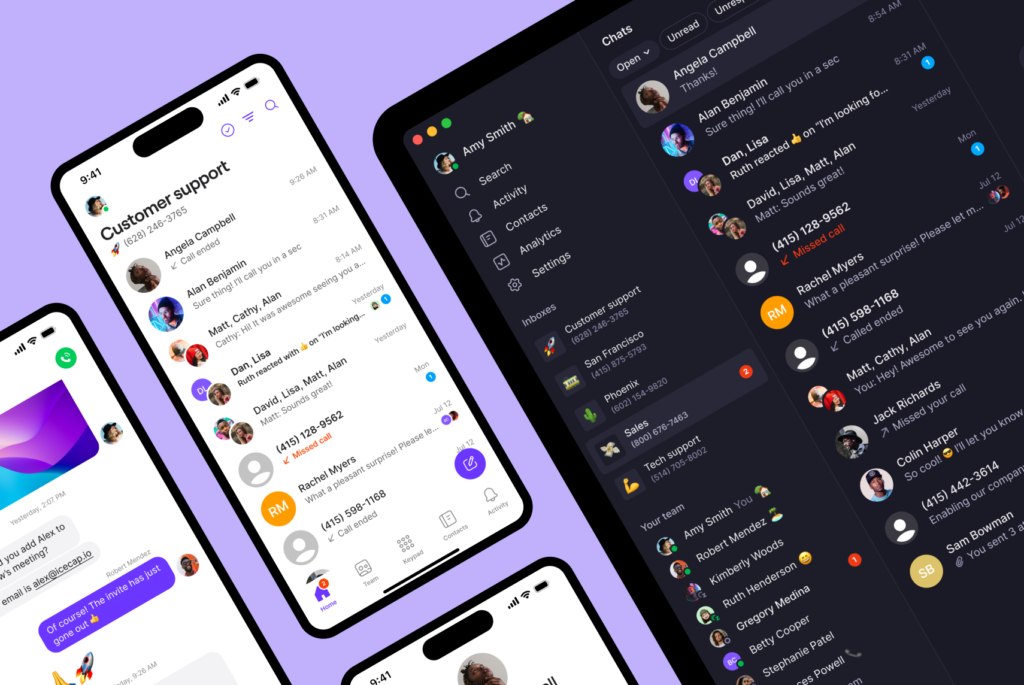
Quo is a modern VoIP phone system built for growing businesses. We help you close more sales, support customers, and grow your business.
When you sign up, you can get one free US, Canadian, or toll-free number for every user on your team. You can always get more numbers for $5 each per month.
Want team members to share responsibility for answering calls and texts? Assign them to shared phone numbers. Simultaneous ring and shared inbox features help you respond faster and keep things moving.
But Quo is more than just a second phone number app. It also lets you set up:
- Auto-attendants to let customers route their own calls
- Texting auto-replies to respond to texts, missed calls, or voicemails with a predefined message
- Integrations to speed up your workflow. Quo integrates with over 9,000+ apps natively and through tools like Zapier and Make

Need to keep track of conversations? You’ll get access to call recordings, transcripts, and summaries — plus AI call tags that label conversations by topic and sentiment. And with Sona, our AI voice agent that can answer FAQs and take messages, you can ensure customers get support 24/7.
How to get a second phone number with Quo
You can obtain a second phone number with Quo in three simple steps:
Get a second phone number in minutes

- Sign up for an account with Quo — when you sign up, you can try Quo free for seven days.
- During signup, select your city or area code in the US or Canada to pick your phone number or select a North American toll-free number.
- Verify your account with an existing phone number and a credit card.
Then once you’ve signed up, download the iOS, Android, PC, or Mac app to use on any of your devices.
You can also download the Quo apps here:
During the signup process, you’ll be asked for a credit card to help keep bad actors off the platform. When your trial is set to expire, we’ll email you a heads-up to the email address you used to sign up. That way, you can try calling from your computer for free to confirm it’s a great fit.
If you run into any issues during the signup process, fill out this support form to reach our team.
Key features of Quo
- Free calls and texts in the US and Canada
- Text from your computer, smartphone, or tablet
- Affordable international calls
- Shared phone numbers
- Direct team messaging, internal threads, and other collaborative elements
- Call recording
- Voicemail transcriptions
- Auto-attendant with IVR
- Texting automations, like auto-replies and scheduled messages
- Integrations with business apps like Jobber, Zapier, HubSpot CRM, Claude, and ChatGPT; connect other tools through Make and the Quo API
Quo pricing
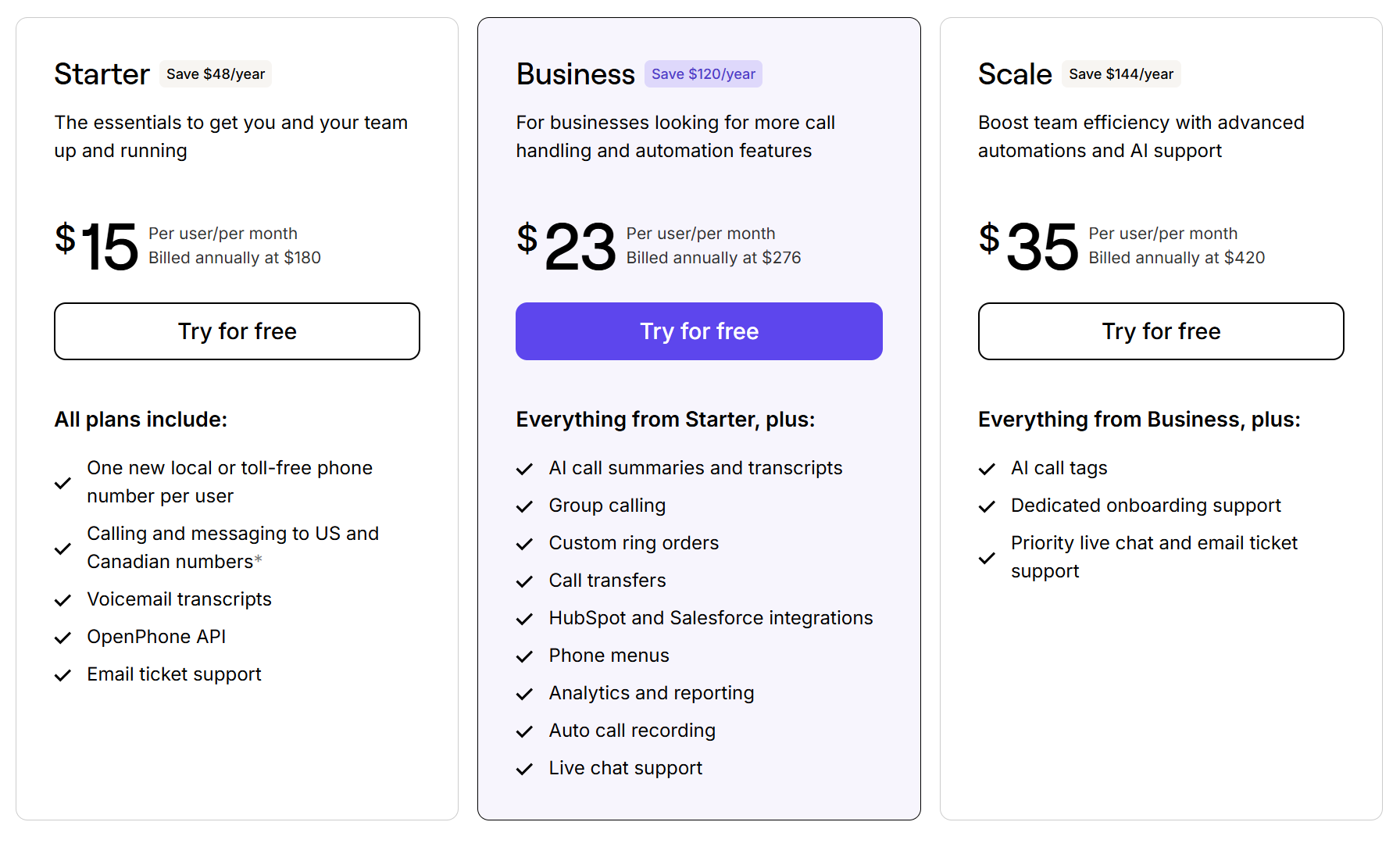
Quo offers three pricing plans:
- Starter: $15 per user per month for unlimited calls and texts, shared numbers, Zapier integration, and more
- Business: $23 per user per month to access phone menus with IVR, call transfers, analytics, CRM integrations, and more
- Scale: $35 per user per month for AI call tags, dedicated onboarding, inbound phone support, and priority chat and email support
2. Google Voice: Best for solopreneurs with Google Workspace

Pros
- Free calls to the US and Canada
- Free limited plan for personal users
- Ring groups with an upgrade
Cons
- Texting is available in the US only
- No toll-free numbers or desktop app
- No integrations besides Google
- Requires a Google Workspace subscription
Google Voice for Google Workspace is a popular second phone number app for iPhone, Android, and web users. It’s free for individuals and gives you unlimited calling in the US and Canada.
For business users, Google Voice offers paid plans through Google Voice for Google Workspace. It offers basic features like VoIP call forwarding, voicemail transcription, and call recording. But you’ll have to upgrade to unlock phone menus and ring groups.
Some limitations to keep in mind:
- You can’t text if you’re located outside the US
- You can’t get a toll-free number
- You don’t get any integrations outside Google’s ecosystem
- You don’t have any advanced texting features
- You can’t collaborate with your colleagues by tagging them in conversations.
If you want a more capable business phone system, consider a Google Voice alternative.
You can download the Google Voice apps here:
Key features of Google Voice
- Unlimited calls to the US or Canada from the US
- Unlimited texts in the US
- Auto-attendant with upgrade
- Integrations with Google Calendar and Google Meet
Google Voice pricing
Google Voice offers three pricing plans for individuals and three pricing plans for teams. Personal plans are only available to US customers, while team pricing is available in 14 countries, including Belgium, Italy and Spain.

Here are the Google Voice pricing plans for individuals:
- Standard: Introductory price of $10 per month for the first six months, after which it is $20 per month. Access AI note-taking with Gemini and auto-attendants in this plan.
- Basic: Free, limited to one user, with unlimited domestic calling and texting.
- Starter: $10 per month to access three-way calling, seamless call transfers, and easy call recording.

Here are the Google Voice pricing plans for teams:
- Starter: $10 per user per month, with a 10-user maximum, for calls and texts in the US, call forwarding, and SLAs
- Standard: $20 per user per month to access on-demand call recordings, ring groups, and phone menus
- Premier: $30 per user per month to access automatic call recordings and advanced reporting
Google Voice team plans also require a Google Workspace subscription, which starts at $7 per user per month.
3. TextNow: Best free second phone number app with high-speed data plans

Pros
- Free phone number
- International calling
Cons
- Ad-free requires an upgrade
- Only available in the US and Canada
- Some users report number misuse
- Not built for businesses
- Not compatible with all phone models
TextNow is a Canadian second phone number app that offers unlimited free calling and texting in the US and Canada. Since it works on a PC, iPhone, Android, and iPad, you can switch between devices while working on the go.
If you don’t want to be limited to WiFi calling, you can pay a one-time fee of $3.99 for a SIM card.
TextNow is a good option if you want to get a cheap second phone number for personal use. It gives you the basics for calling and texting easily. Just know that it might not be the most secure platform. Some users also complain of too many ads. If you want to make phone calls without ads, you need to pay for an upgrade.

You can download TextNow here:
Key features of TextNow
- Free phone number, but fees apply to premium numbers
- Voicemail transcription with an upgrade
- Incoming caller ID with an upgrade
- Scheduled messages, iPhone only
- International calling and texting with the purchase of credits
- Number locking to secure a number
TextNow pricing

TextNow’s basic service is free but includes ads. Here’s a breakdown of its plans:
- Free: $0 per month for a free phone number, nationwide 5G talk and text, and access to unlimited data, verification codes, caller ID, and voicemail transcription by earning them through Rewards
- Plus: $4.99 per week or $18.99 per month for unlimited data without streaming services, an ad-free experience, and full access to verification codes, caller ID, and voicemail transcription without needing to earn them
- Unlimited: $8.99 per week or $35.99 per month for unlimited data that includes streaming
4. Burner: Best for temporary personal numbers

Pros
- Purchase up to 100 phone numbers at once on iOS
- Unlimited calls and texts
- Ad-free
- Spam filters
Cons
- Not built for business use
- No integrations
- No call recordings
- No auto-attendants
- Not reliable enough for business calls
Burner is a second phone number app for Android and iOS designed to protect your privacy. You get unlimited calls and texts, and can use spam-blocking to filter unwanted calls and messages. There are also Do-Not-Disturb settings to prevent incoming calls 24/7.
On iOS, you can purchase up to 100 numbers, and on Android, up to 10. You can easily switch between numbers in your inbox and delete your alternate phone numbers at any time. This is ideal if you need short-term numbers for a temporary situation, like traveling.
But Burner isn’t the best option for teams looking to make a good impression. While you can use it to get local phone numbers with area codes throughout the US and Canada, it doesn’t come with any essential business features. For example, you won’t have shared numbers, call recording, or VoIP integrations.
If you just want a second phone number for your personal life, you can download Burner here:
Key features of Burner
- Unlimited calls and texts in the US and Canada
- Text message auto-replies
- Spam call blocking
- Occasional free trial with promotion in-app
Burner pricing

Burner’s pricing plans depend on where you purchase them:
- Web Standard: $3.99 per month for one number purchased on the web, billed annually
- Web Premium: $5.83 per month for one number, video messaging, AI voicemail transcription, VPN, and reverse number lookup, billed annually
- App Store: $4.99 per month for one number purchased from the iPhone app, billed annually
- Play Store: $4.99 per month for one number purchased from the Android app, billed annually
5. Hushed: Best for making personal calls to international numbers

Pros
- Flexible pricing plans
- Customizable auto-reply texts
- US, Canadian, and UK number options are available
Cons
- Unlimited calling and texting require an upgrade
- No integrations
- No call recordings
- No auto-attendants
Hushed is a personal second phone number app that lets you choose from Canadian, US, and UK phone numbers. You also get features like custom voicemail, call forwarding, and auto-reply messages.
Hushed’s Unlimited plan gives you unlimited local texts and calls in the US and Canada. If you’re traveling, you can opt for their Pay-as-you-go plan for international calls. You can purchase credit packs and make international calls after you activate them.
That said, Hushed lacks the business-friendly features you may need to communicate efficiently.
If you just want an extra number to hide your personal one, you can download Hushed here:
Key features of Hushed
- Voicemail greeting
- Call forwarding
- Texting, including sending GIFs, photos, and videos
- Auto-replies
- Call routing
Hushed pricing

Hushed offers three pricing plans to choose from:
- Prepaid: Starts at $7.99 for limited talk and text, with 30-, 90-, and 365-day plans available
- Unlimited: Starts at $6.99 per month for unlimited talk and text, available for one to three numbers
- Pay-as-you-go: Starts at $8.99 per month to use Hushed credits for international calls and texts
6. Line2: Best for basic business phone features
Pros
- Unlimited calls and texts in the US and Canada
- Offers voicemail transcription and recordings
Cons
- No MMS on toll-free numbers
- Outdated interface
- Buggy Android app, according to user reviews
- No shared numbers
Line2 is a second phone number app that supports unlimited calls and texts in the US and Canada via local and toll-free numbers. It’s also available as a desktop and mobile app.
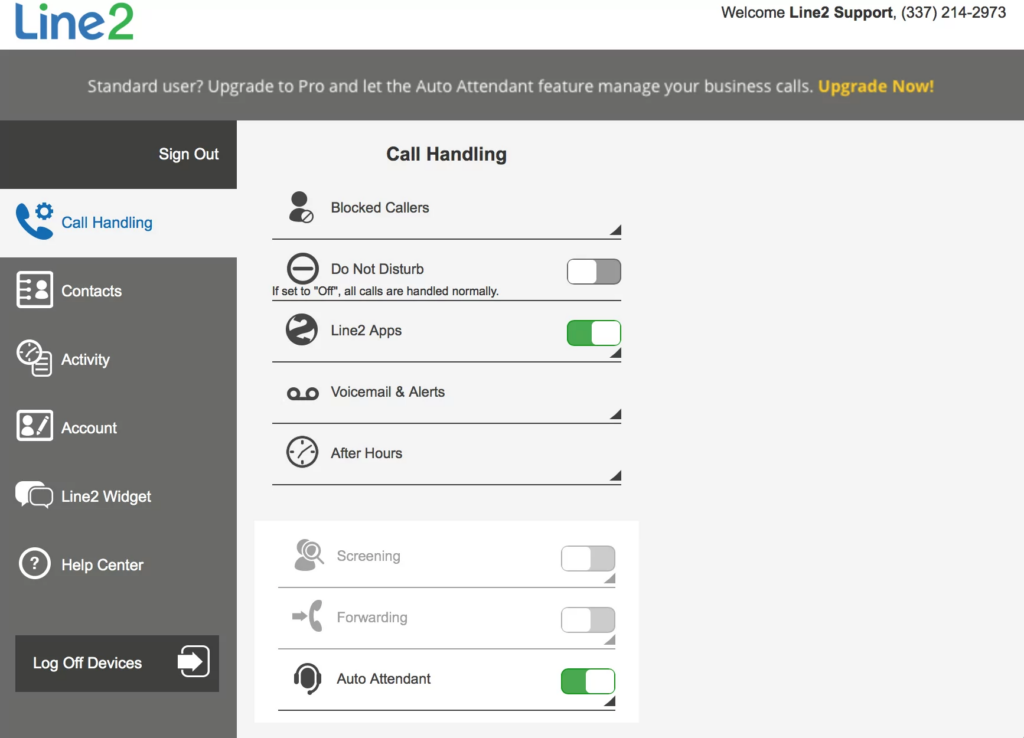
Line2 offers some basic business features, like voicemail recording, voicemail-to-email, and call forwarding. It’s a step up from personal 2nd-phone-number apps like TextNow.
However, there are no shared numbers, call transcriptions, or integrations. It does the job for one-person businesses, but doesn’t work when you add anyone else to your team.
The user interface is also quite outdated, so it might not be everyone’s cup of tea.

If you still want to try Line2, you can download it here:
Key features of Line2

- Unlimited texts and calls in the US and Canada
- Voicemail recording
- Call blocking and screening
- Call forwarding
- Caller ID
- Voicemail transcriptions
Line2 pricing
Line2 offers two pricing options for the same plan:
- Monthly: $9.99 per month
- Annual: $7.99 per month
7. Dialpad: Best for large contact centers

Pros
- Offers unlimited calling to the US and Canada with any plan if you’re based in either country
- Provides AI solutions for call centers
- Access to collaboration tools like team messaging, file sharing, and audio chat rooms
Cons
- User minimums can hike up costs
- No additional numbers on the base plan
- Porting multiple numbers costs extra
- International texting, auto-replies, and integrations require an upgrade
Dialpad is more of a business phone system than a basic second phone number app. It offers business features like unlimited calling and texting in the US and Canada, call routing, and call recording.
It’s best suited for teams with large contact centers due to its AI-powered coaching features like AI scorecards and real-time AI assists.
Just know that Dialpad is an expensive second phone app option for smaller businesses. You must pay for at least three users for the mid-tier Pro plan or 100 users for an Enterprise plan if you do upgrade.
You also need to upgrade to get features like:
- International texting
- Auto-replies
- Integrations outside Google Workspace
Even something as basic as multiple numbers in your account requires an upgrade. Dialpad only assigns one number in its base plan, and if you want access to more numbers, you’ll have to upgrade to the Pro plan.
Another issue? Several teams find Dialpad to be over-engineered and clunky compared to other business phone platforms like Quo.
If you’re still interested, you can try Dialpad by downloading it here:
Key features of Dialpad
- Unlimited calls and texts in the US and Canada
- Call recording
- Video meetings
- Voicemail transcriptions
- Auto-attendant with IVR
- Integrations with business apps like Slack, Zapier, and HubSpot, with an upgrade
Dialpad pricing

Dialpad’s pricing for its business phone solution includes three tiers:
- Standard: $15 per user per month for unlimited calling, multi-level IVR, toll-free number support, call recording, and voicemail greetings
- Pro: $25 per user per month for international texting support, additional numbers, third-party integrations, and 25 ring groups
- Enterprise: Custom pricing for unlimited ring groups, additional integrations, and a 100% uptime guarantee
8. Ooma: Best for reaching Mexico and Puerto Rico

Pros
- Unlimited calling in the US, Canada, Mexico, and Puerto Rico
- Texting in the US and Canada
- Desk phone support
Cons
- Texting is only available on higher tiers
- Text messaging is capped at 250 per month on the Pro plan
- Call recording and voicemail transcriptions are only available on higher tiers
- Not SOC 2 compliant
Ooma is a second phone number app that’s built for small businesses. When you sign up, you can get one free toll-free number for your team or choose from a variety of local numbers. You also get unlimited calling to the US, Canada, Puerto Rico, and Mexico.
Ooma also supports intercom calling and analog fax machines if you still rely on them.
The downside is that Ooma is pretty costly for the value it provides. For example, you can’t access texting, call recording, or voicemail transcriptions on the basic plan. You also need to upgrade to call using Ooma’s desktop app. Otherwise, you have to call exclusively on your phone.
You can download Ooma here:
Key features of Ooma
- Unlimited calls to the US, Canada, Mexico, and Puerto Rico
- Virtual receptionist or auto-attendant
- Call recording with an upgrade
- Voicemail transcriptions with an upgrade
- Desk phone, fax, and intercom calling support
Ooma pricing

Ooma’s pricing includes three plans:
- Essentials: $19.95 per user per month for unlimited calling in the US, Canada, Mexico, and Puerto Rico, extension call monitoring, virtual receptionists, overhead paging, intercom tools, and access to the mobile app
- Pro: $24.95 per user per month for 25-member video calls, 250 texts, call recording, voicemail transcriptions, integrations with Microsoft Office 365 and Google, and access to the desktop app
- Pro Plus: $29.95 per user per month for CRM integrations like Salesforce, team chat, call queues, hotdesking, 100-participant video conferencing, and 1,000 text messages
If you port your number to Ooma, you’ll also have to pay a one-time fee of $39.95.
9. Grasshopper: Best for phone number extensions

Pros
- Unlimited calling to the US and Canada
- Auto-attendant phone menu with extensions
- Voicemail transcriptions
Cons
- Only one number per account unless you upgrade to the most expensive plan
- Call recording requires an upgrade
- No integrations besides Google Voice
- Not suited for international calling and texting
Grasshopper is another VoIP platform marketed to solopreneurs and very small businesses. It offers all its features in every plan. This includes unlimited calling and texting, voicemail transcriptions, and custom voicemail greetings.
The difference between the plans is how many users, numbers, and extensions you can have, plus whether you get call recordings. The base plan supports one user and gives you a single number and extension. You can upgrade to the mid-tier plan for unlimited users, but you still only get one phone number.
Grasshopper also lags behind other business phone options in terms of the features it offers. For example, it doesn’t offer integrations aside from Google Voice, shared phone numbers, or call transcripts.
While it offers local and toll-free numbers, you can only send MMS and group messages from local US numbers.
Plus, you can’t send SMS messages internationally or from a toll-free number to a Canadian number. Want to make international calls? You have to put down a $500 deposit first, which is another obstacle if you want to stay in touch globally.
You can download Grasshopper’s apps here:
Key features of Grasshopper
- Unlimited calls in the US and Canada
- Voicemail transcriptions
- Call recording with an upgrade
- Local and toll-free numbers, with additional numbers for $9 per month each
- Phone number extensions, with additional extensions for $3 per month each, with an upgrade
- Call forwarding
- Call transfers with an upgrade
Grasshopper pricing

Grasshopper has three pricing plans — True Solo, Solo Plus, and Small Business. Here’s how much each plan costs:
- True Solo: $14 per month for one user, one phone number, and one extension
- Solo Plus: $25 per month for unlimited users, one phone number, and three extensions
- Small Business: $55 per month for unlimited users, four phone numbers, and unlimited extensions
10. Sideline: Best for businesses that mainly communicate through text
Pros
- Unlimited calls and texts
- Auto replies
Cons
- Requires carrier minutes for calling
- No shared numbers
- No integrations
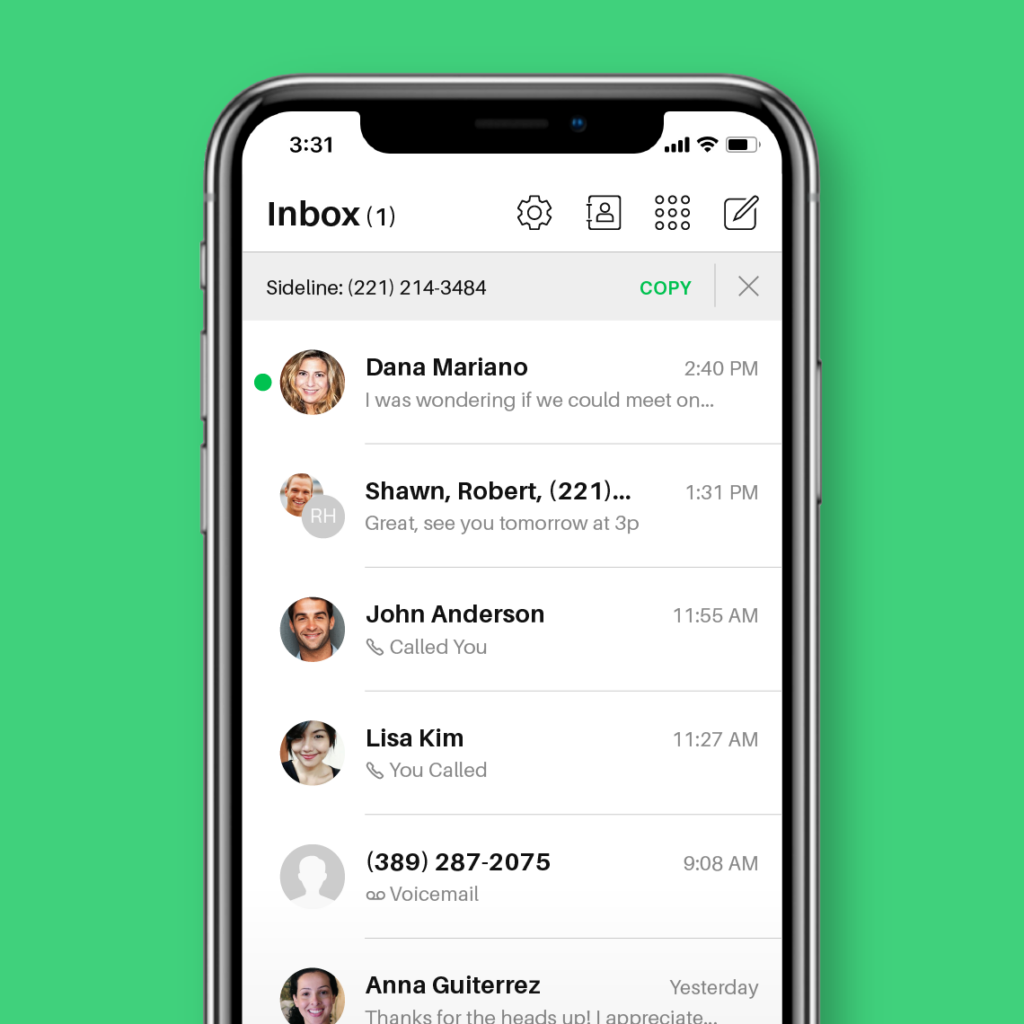
Sideline is best known as a business text messaging service. Its most useful features, like auto-replies and text marketing tools, help you text clients with ease. However, its Enterprise plan was recently discontinued. So international calling and auto-attendants are no longer available.
We also noticed it’s missing business features like:
- Toll-free numbers
- Call recordings
- Integrations
- Call routing
- Extensions
Keep in mind that with Sideline, you must activate VoIP calling in the app’s settings to make calls over the internet instead of using your cell phone minutes.
You can download Sideline here:
Key features of Sideline
- Unlimited calls and texts in the US, except Hawaii and Alaska
- Group messaging
- Text message auto-replies
- Business hour settings
- Number porting
- Verification code support
Sideline pricing
Sideline pricing only offers one plan. However, you get a discount if you purchase it for six months or one year.
- Monthly: $14.49 per month for one phone number and unlimited calling and texting within the US and Canada
- Half Yearly: $69.99 per month for six months
- Yearly: $129.99 per month for 12 months
11. 2Number: Best for verification purposes

Pros
- Can buy numbers for six countries
- International calling and texting are available with credits
- Call recording
Cons
- Need to purchase credits for calls and texts
- No integrations with third-party apps
- MMS is only available for US and Canadian numbers
2Number is a second number app that works well for getting local numbers in different countries. You can use your number for two-factor verification, calls, texts, and voicemail.
However, there are a few limitations to keep in mind. Unlike some other apps on this list, 2Number doesn’t offer unlimited calls or texts. You’ll have to purchase credits to communicate.
Business features are also limited. Aside from call recording, voicemail, and call transcripts, 2Number doesn’t offer much. For example, you can’t have shared numbers, auto-replies, or app integrations.
If you still want to try 2Number, you can download it here:
Key features of 2Number
- Call recording with an upgrade
- Voicemail with an upgrade
- Call transcripts and summaries
- International calling to 100+ countries
- Business hours voicemail
- International numbers are available
2Number pricing
You can expect to pay $7.99 per week or $69.99 per year, which gives you access to all the app’s features. A subscription provides monthly credits you use to make calls, and the amount of credits you’ll need varies by country.
12. eVoice: Best option with a live receptionist offering

Pros
- Unlimited calling in the US and Canada
- Three phone numbers are included in the subscription
- Live receptionists are available as an add-on
- Caller ID and time-based routing
Cons
- Unlimited text messaging requires an upgrade
- Limited integrations
- Limited collaboration features
- Call recording is only available as an add-on
eVoice offers calling, texting, and live receptionist services through its browser and mobile apps. You can buy local and toll-free numbers. Then, set up phone menus and routing schedules to control how you take calls.
As an add-on, you can also have a human receptionist answer calls, schedule appointments, and handle admin. That said, the cheapest plan costs $188.95 per user per month for 50 live receptionist minutes. One overly complicated call with a customer can eat up a lot of your monthly minutes.
One big caveat to keep in mind: eVoice operates more like a call-forwarding service than an actual VoIP phone. You can buy local and toll-free numbers through their platform. But to make or receive calls, you need to own an active 10-digit phone number.
You’ll also have to pay extra for basic features like unlimited texting, voicemail transcriptions, and call recording. Necessary features like MMS, shared numbers, and auto-replies aren’t available.
If you want to try eVoice, you can download it here:
Key features of eVoice
- Unlimited calls within the US and Canada
- Multiple extensions
- Toll-free or local numbers
- Hold music
- Auto-attendant
- Virtual fax
- Conference calling with up to 94 participants
- Usage reports
- Call routing
- Professional greeting with an add-on
eVoice pricing

eVoice offers two pricing plans:
- Elite: $12 per month for unlimited calls in the US and Canada, local or toll-free numbers, advanced call handling, and multiple extensions
- Elite Plus: $19 per month for everything in Elite and unlimited messaging in the US and Canada
How to pick the right second number app for you
There are a lot of options for second phone number apps. Each one is suited for a particular use case. Use these steps to pick the right app for you:
- Identify what you need the app for. Do you need a second number for personal or business reasons? Are you a solopreneur separating personal and business calls? Or are you running a growing business and need shared numbers and collaboration tools? If you just need a personal number, you can opt for simpler apps like TextNow or Burner, while teams should look at providers like Quo.
- Identify your budget. Free options like TextNow work for basic personal use. In the $10–$20 per user per month range, consider providers like Quo, Grasshopper, or Sideline.
- Prioritize your must-have features. Need temporary privacy numbers? Try Burner or Hushed. Need international calling to Mexico or Puerto Rico? Consider Ooma. Want business features that help your team collaborate? Quo is the top pick.
- Check for deal-breakers. These include not having ownership over your number, poor call quality, hidden fees, and low reliability. Look for third-party reviews to confirm this.
- Test before committing. Most providers offer 7–14 day free trials. Test call quality in your work environment, try both mobile and desktop apps, and contact support if you have a question.
Quick picks: Second phone number apps by use case
Want to know which app is right for your team? Here’s a quick look at the best options for your specific use case:
- Choose Quo, formerly OpenPhone, if you need a business phone app that can grow with your team. Share phone numbers and automatically log calls and texts in your CRM. Record calls and take notes on autopilot, and set up automated text workflows too.
- Choose Google Voice if you are a solopreneur and already have a Google Workspace account.
- Choose TextNow if you want a genuinely free number and can live with ads.
- Choose Burner or Hushed if you want temporary phone numbers for personal use.
- Choose Grasshopper if you want to share multi-digit extensions with a flat monthly rate instead of per-user pricing.
Get a second phone number for free with Quo

When you get a second number, you have an affordable way to separate business and personal calls. This ensures you don’t have to answer clients after hours and keeps your personal number private.
If you need a second phone number just for yourself, a free app can work fine. However, you have to be OK with ads and the risk of losing your number if you don’t use it enough.
If you want a second phone number built for a growing business, you should get a business phone app like Quo. It gives you a single place to share your phone numbers, calls and texts, and the conversation data that informs your team’s decisions. Free apps offer none of these features, so you can’t scale with them as you grow.
Try Quo for free for seven days to see if it’s the right solution for your business needs. Start your free trial today.
FAQs
Second phone number apps offer several advantages. However, they aren’t perfect solutions for every use case. Here’s where they fall short:
• Can’t accept verification codes. It’s easy to get a new phone number with a virtual phone app, which makes it vulnerable to being used by scammers. As a result, most messaging, banking, and ride-hailing services require a carrier-provided mobile number for verification.
• May not work well if you operate from a very remote location. Most second phone number apps need an internet connection to send and receive calls and texts. If you’re in a remote location without access to WiFi or mobile data, this could affect your ability to use these apps.
eSIMs provide a true cellular connection and work without an internet connection. They’re ideal for international travel or personal use when you need a local number abroad. Second phone number apps run over the internet and can offer basic calling and texting. But for running a business, you need more than just a second number — you need a complete business phone system like Quo. Quo gives you professional tools like shared numbers and team collaboration features.
Call quality on second number apps depends on the provider and your internet connection. High-quality business-focused apps are more likely to invest in better Voice over Internet Protocol, or VoIP, infrastructure. On the other hand, free or low-cost apps can sometimes have inconsistent call quality.
You can improve your call performance by ensuring you have a strong, stable internet connection and choosing a reputable app.
To add a second phone number to your device without incurring extra charges, sign up for an app like TextNow. These apps usually offer essential features at no cost, like a set limit on texts or call minutes. To begin, download one of these apps from your smartphone’s app store, create an account, and select your new number.
Keep in mind that these free second phone number apps are fine for personal use but are difficult for businesses to use.
To get started using most second phone number apps, you can:
1. Sign up for a VoIP phone service on the provider’s website or through the App Store or Google Play Store.
2. Choose a new phone number during the signup process. If you have an existing number, you may be able to port it over for free, depending on the service provider.
3. Download your VoIP provider’s app for any devices you wish to access your phone system from.
You can now start calling and texting from your second number — just like you would on your smartphone’s built-in calling and messaging apps.
It depends on the app and the service sending the code. Many platforms block verification texts to VoIP or virtual numbers to prevent fraud. It’s best to use a personal mobile number from a traditional carrier for verification code purposes.
The best second phone number apps encrypt your data and have other security protocols to protect it. For example, Quo is SOC 2 compliant. Just like you would with your personal number, it’s best to take additional precautions. This includes using strong passwords and virtual private networks.
Not all second phone number apps are equally secure, especially when it comes to your data privacy. Free, ad-supported apps like TextNow generate revenue by showing ads and collecting user data for targeted advertising. Some may even sell or share your personal information with third parties, and many lack end-to-end encryption — meaning your conversations could be intercepted.
According to a 2024 FTC report on data practices, many free platforms collect vast amounts of personal data with limited transparency around how it’s stored, shared, or deleted.
Before choosing any second number app, read the privacy policy carefully. Look for specifics on what data is collected, how long it’s stored, and whether it’s shared with advertisers or third parties.
Yes, with many apps, it’s possible to port your existing number. But this isn’t always free. Some providers, like Google Voice, might charge you to transfer your number.
Most second number calling apps that use VoIP infrastructure don’t work without an internet connection. That connection can be over WiFi or mobile data, but you need it to send and receive calls and texts. They can make calls without a SIM card. Other apps, like Sideline, use an existing cellular connection, so they don’t need the internet to function. The virtual phone system you choose depends on your access to a strong internet connection.